编程语言拟人图
In the past few years, I have drawn a series of the personified bank departments. I tried to draw the programming language personification these days. There are six languages that I have used so far. The characteristics of those programming languages are marked according to my personal understanding, and the colors are taken from the language logo (Python, Java, C++, JavaScript, Scala, C#).
前几年画了银行部门拟人图,这两天尝试了一下编程语言拟人图。目前使用过的语言有六种(Python, Java, C++, JavaScript, Scala, C#),这里仅根据我的个人一点理解给这些拟人化的编程语言标注了特点,颜色多取自语言logo。
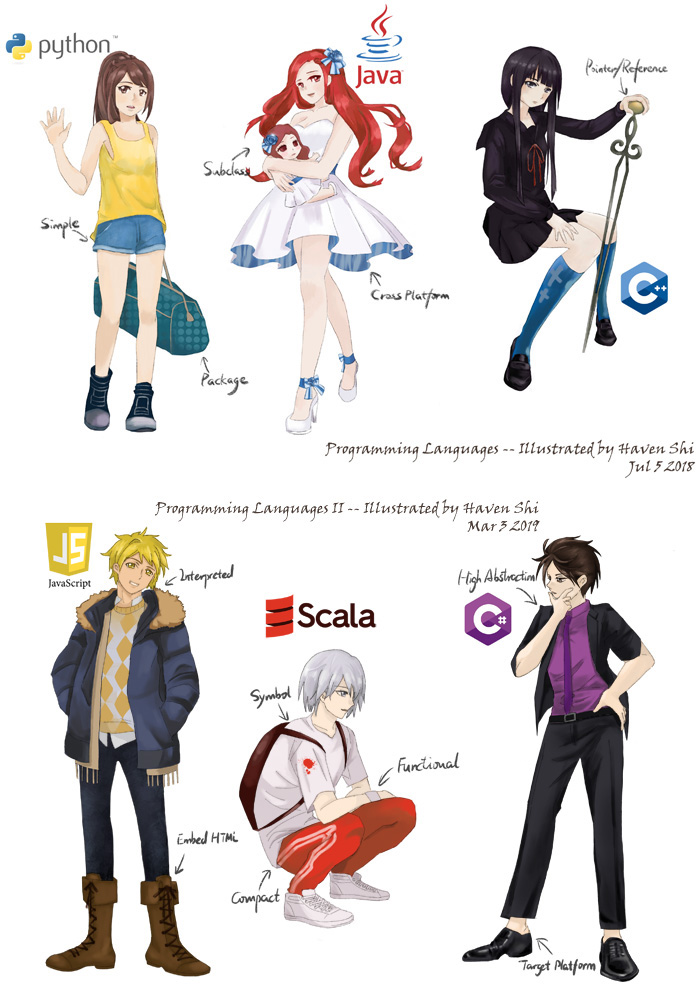
I happened to view my previous pictures and was surprised that the level of my painting skill has improved a lot, therefore, I summarize some tips as follows:
存档的时候看了下之前的文件,感叹个人作画水平提高了不少,于是总结几点tips:
Tips:
1. The line draft should be clear
1. 线稿要清晰
-
Since I have not been trained systematically before, it is impossible to express the author's intention completely with the same lines as the experts do. So, when drawing the line draft, it is necessary to draw the details of each character including the shadow, folds, in order to avoid not understanding what the original lines want to express when filling color.
-
由于没有经过系统训练,无法做到跟业界大牛一样线条可以完全的精准的表达作者意图,因此画线稿的时候一定要把每个人物细节包括阴影褶皱都画清晰,避免涂色时不明白原始线条想表达什么意思。
2. The character structure should be accurate
2. 人物结构要准确
-
Most amateur authors want to draw a big head and lack the experience of the body structure because lack of sketch practice. In this case, if you don't have much time to practice sketching, you need to observe more and learn more of human structures in spare time.
-
大多数业余作者喜欢画个大头而身体结构缺乏经验,其原因是没有经过素描联系。碰到这种情况,若平时没有时间练习素描,平时需要多观察现实中人的结构,多学习多思考。
3. The color should be bold
3. 颜色要大胆
-
For example, when drawing shadows, you need to not only reduce Saturation or Brightness, but also boldly adjust Hue to add warm colors, so that Hue can be closer to nature of various shadows. In real life, the color we see is the result of light interaction of different wavelengths.
-
例如画阴影的时候,不只是降低Saturation或者Brightness ,也要大胆的调节Hue加入暖色调,这样hue不同了阴影才能更贴近自然,现实生活中我们所看到的颜色正是不同波长的光相互作用的结果。
4. The use of painting software
4. 绘画软件的运用
-
I used photoshop and painter before, but I was eager to work on it at that time, so I didn’t learn the painting software very well. Now I am using Procreate, and I’m also familiar with its various functions. I’m not quite capable of making everything work, but at least it will like a duck to work. Therefore, it is very important to learn the software well, and use various shortcut keys to liberate your hands.
-
以前用过photoshop,painter,不过很遗憾那时候急于求成所以绘画软件都没学透。现在我用的是procreate,也抽空熟悉了它的各种功能,作起画来不说做能到游刃有余,但至少也会如鱼得水。所以,学好软件很重要,擅用各种快捷键,解放双手。
Let's stop here, the picture on this blog is zoomed out, if you are also a paint enthusiast and would like to discuss further, please find my contact information through the about tag.
先说到这里,blog上的图是经过缩放的,如果你也是绘画爱好者并且想要进一步讨论,你可以在about tag找到我的联系方式。
~~aaaaaa my eyes~~
have been staring at the computer too long**